
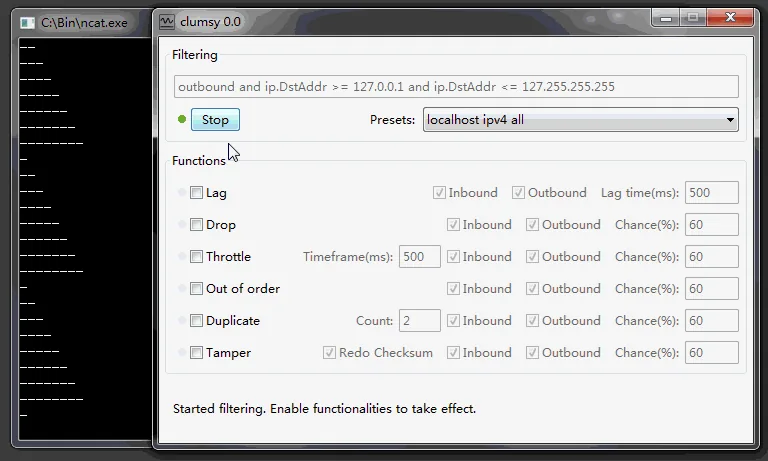
Choose Win64 when System Type shows x64-based PC, download clumsy-0.3-win64-a.zip from GitHub, compare its checksum, extract every file and run it only in an authorized test environment.
01
Is Clumsy compatible with Windows 10?
The official README explicitly describes Clumsy as a network latency, delay and packet-loss simulator for Windows 7, Windows 8 and Windows 10. That makes Windows 10 part of the project's documented platform scope. Version 0.3 publishes both Win64 and Win32 archives, allowing it to match the two Windows architectures still relevant to the project.
Compatibility does not mean every corporate security policy will allow packet interception. Clumsy relies on WinDivert, and Windows or endpoint security software may request approval, block a driver signature or log the activity. Those controls are part of the environment you need to evaluate. Use the official archive, verify it and involve the device administrator when policy requires approval.
Windows 11 is not named in the official README checked for this guide. Some installations may work, but this site does not turn anecdotal success into an official compatibility guarantee. Test on a reversible Windows 11 environment and document the exact operating-system build, security policy and Clumsy archive if newer Windows support matters to your team.
| Windows environment | Official documentation status | Recommended action |
|---|---|---|
| Windows 10 x64 | Explicitly listed; Win64 asset available | Use Win64 A and verify checksum |
| Windows 10 x86 | Explicitly listed; Win32 asset available | Use Win32 A |
| Windows 11 | Not explicitly listed in official README | Test locally without claiming guaranteed support |
| Managed corporate endpoint | Depends on local driver and security policy | Request administrator review |
02
Choose Clumsy Win64 or Win32 on Windows 10
Open System Information from the Start menu and find System Type. An x64-based PC should use the Win64 archive. An x86-based PC should use Win32. Do not choose based on whether the application under test is 32-bit; choose the Clumsy build that matches the Windows operating-system architecture.
For most Windows 10 users, clumsy-0.3-win64-a.zip is the correct starting point. It is 536,789 bytes and the SHA-256 checked for this update is F50DC734148815831C67D9FC2C246C22D421C53DCEA51E26EEE905B0B2806C27. The Win32 A archive is 581,772 bytes with SHA-256 57B880F65E8A628A84749DF09358235676E361F576FC263F00F4F275C1A4EA51.
The 0.3 Release also contains B and C variants. Their release note describes different WinDivert signatures, not different Windows features. Start with A, and only consider another official signature after understanding why a security product or policy rejects the first file.
03
Clumsy download for Windows 10: install steps
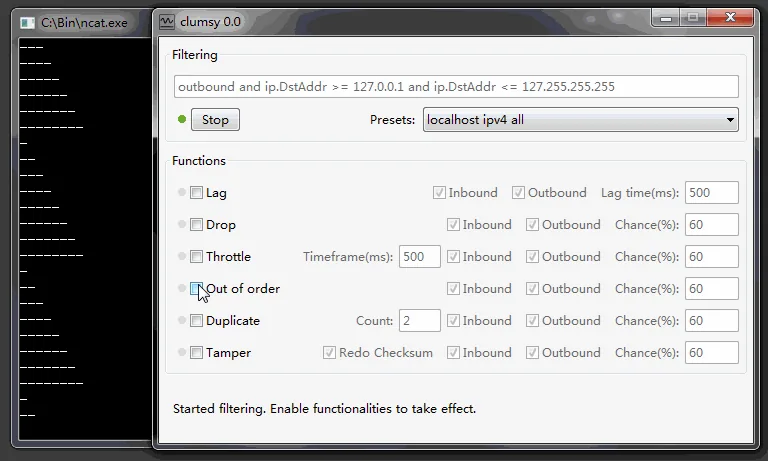
The Clumsy download for Windows 10 is a portable ZIP, not a conventional installer. Save the official archive in a folder you can find, calculate its checksum if integrity matters to your workflow, then use Extract All so the executable and supporting files remain together. A shortcut is optional; no background service needs to be installed for the basic portable workflow described by the project.
Before running Clumsy, save work and close nonessential network applications. When Windows asks for permission related to the executable or packet-diversion driver, confirm that the file came from the verified GitHub release. On a managed device, do not override organizational controls; ask the administrator to review the source, checksum and intended test case.
Once the window opens, do not immediately apply a broad impairment. Read the Clumsy how-to-use guide, create a narrow filter and begin with one modest Lag setting. Select Stop when the observation is complete and confirm the baseline has returned.
- Check System TypeIdentify x64 or x86 before downloading.
- Use the official ReleaseChoose version 0.3 under jagt/clumsy.
- Verify the archiveCompare filename, bytes and SHA-256.
- Extract all filesDo not launch only the EXE from inside the ZIP.
- Run an authorized testUse a narrow filter and restore the baseline afterward.
04
Understand Windows Defender and driver prompts
A network impairment utility behaves differently from an ordinary document editor. Clumsy captures and modifies matching packets through WinDivert, which can look sensitive to endpoint protection. A prompt or detection should be investigated, not ignored. Confirm the official owner, release tag, archive checksum and extracted files before making a decision.
Do not treat ‘downloaded from GitHub’ as the only safety check because GitHub hosts many unrelated repositories and forks. The owner must be jagt and the repository must be clumsy. Likewise, do not treat a warning as automatic proof of malware without examining what component and signature triggered it. Context matters, especially for packet capture drivers.
If policy blocks the A signature build, the official release provides B and C alternatives with different WinDivert signatures. That is not permission to cycle through files until one evades protection. Review the policy and obtain authorization. A managed endpoint may intentionally prohibit all such tools.
Use official source verification and organizational approval. This site does not recommend bypassing Windows security controls.
05
Run a controlled first test on Windows 10
Choose a non-critical application and measure one normal action before enabling Clumsy. Then set a narrow filter, enable Lag with a modest delay, select Start and repeat the action. Observe loading feedback, timeouts, cancellation, retries and state preservation. Do not judge only by whether the page feels slower.
Select Stop immediately after the observation. Repeat the baseline action to confirm normal network behavior. If the problem remains, close Clumsy and check whether a VPN, proxy, firewall, other packet tool or application state is involved. A clean recovery check prevents a test artifact from being mistaken for a product defect.
After the latency workflow is understood, move to the dedicated packet-loss test. Keep each run focused and record the Windows build, Clumsy archive, filter, impairment values and outcome.
06
Troubleshoot Clumsy on Windows 10
If Clumsy does not open, confirm the ZIP was fully extracted and the build matches System Type. Keep the executable with its supporting files. Re-download from the official release if the checksum does not match. Avoid ‘fixed’ installers or repackaged downloads that add unknown components.
If the program opens but traffic does not change, review the filter and direction before increasing impairment values. A filter that matches no packets will produce no visible effect. A broad filter can affect too much. Return to a known simple test case and use project documentation for WinDivert filter syntax.
If connectivity does not recover, select Stop, close the program and confirm the process ended. Recheck the baseline, then investigate other local network software. Restarting the test environment can be appropriate, but record the problem first so the team can distinguish a Clumsy process issue from an unrelated Windows network state.
- Wrong architecture: choose Win64 for x64 Windows and Win32 for x86 Windows.
- Missing files: extract the complete ZIP to one folder.
- Blocked driver or signature: review the exact security event and policy.
- No visible impairment: verify the filter matches the intended traffic.
- Lingering problem: stop Clumsy, close it and retest the baseline.
FAQ
Clumsy Download for Windows 10 FAQ
Which Clumsy download is best for Windows 10?
Most Windows 10 PCs use clumsy-0.3-win64-a.zip. Confirm System Type is x64-based before choosing it.
Does Clumsy install a Windows service?
The official distribution is a portable ZIP. Extract the files and run the application; it is not delivered as a conventional setup wizard.
Why might Windows Defender flag Clumsy?
Clumsy uses WinDivert for packet capture and modification, behavior that security tools may inspect. Verify the official source and checksum and follow device policy rather than disabling protection blindly.
Does Clumsy work on Windows 11?
The official README lists Windows 7, 8 and 10. Windows 11 is not explicitly documented there, so test it locally without treating compatibility as guaranteed.
Can I use Clumsy without administrator access?
Packet-diversion behavior may require elevated permission. Use only access granted by the device owner or organization; do not attempt to bypass policy.