
Recommended
Windows 64-bit
For most Windows 10 computers and other x64 Windows installations.
- File size
- 536,789 bytes
- Archive
- ZIP
- SHA-256
- F50DC734...B2806C27
Open-source Windows network testing
The Clumsy download for Windows comes directly from the verified jagt/clumsy GitHub 0.3 Release. Clumsy is a portable network condition simulator for controlled latency, packet loss, bandwidth, duplication, reordering and packet tampering tests.
Official GitHub asset · 536,789 bytes · checked July 20, 2026
Choose the right build
Most current Windows PCs use the 64-bit build. Select 32-bit only when Windows System Information identifies an x86 system. Both primary files below are unchanged assets from the official 0.3 GitHub Release.
The 0.3 release provides A, B and C binaries with different WinDivert signatures. Their Clumsy features are otherwise identical. If a security product blocks one official signature, the project provides these alternatives; review the official Release notes before switching.
Know what you are downloading
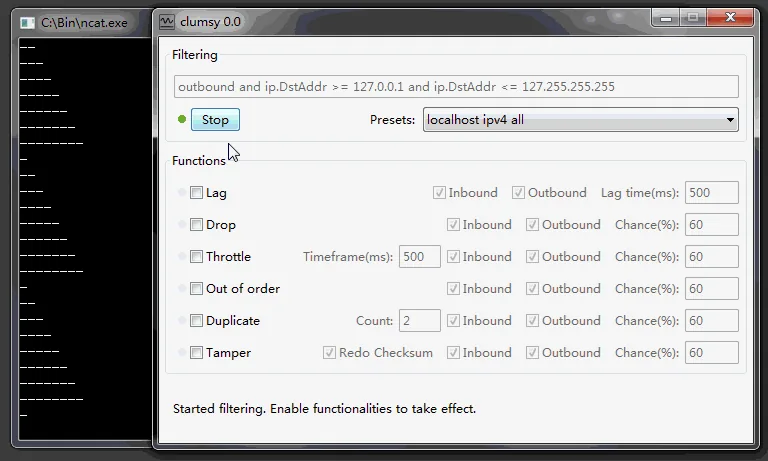
Clumsy is a Windows desktop utility that intercepts live network packets with WinDivert, applies a controlled impairment, and then releases or discards those packets according to the settings you choose. It was built for developers, QA engineers and technical testers who need to reproduce the awkward conditions that real users experience: slow responses, intermittent loss, duplicated data, limited throughput, reordered packets or deliberately corrupted traffic. The application works system-wide, so a browser, desktop client, local service or test build can be exercised without changing its code or configuring a proxy.
A Clumsy download is a small ZIP archive rather than a conventional installer. Extract the archive, run the executable with the permissions required for packet capture, choose a filter and impairment, then select Start. Because Clumsy changes network behavior for matching traffic on the computer, begin with a narrow filter and a disposable test session. Stop the test before changing important network settings, signing in to sensitive services or joining calls that depend on a stable connection.
This site does not rebuild or wrap the program. The download buttons point to release assets published by the jagt/clumsy GitHub project. We record the version, source URL, exact byte size and checksums for the two primary A builds so visitors can compare a downloaded archive with the file checked during this update. That source-first approach also makes it clear when a search result mentions an unofficial version number that does not appear in the official release history.
Clumsy is a network testing tool, not a general internet speed booster and not a NetLimiter replacement. It intentionally makes selected traffic worse so a team can observe timeouts, retries, offline messages and recovery behavior. Use it only on systems and traffic you own or are authorized to test. This site does not publish anti-cheat bypasses, undetected lag switches or instructions for disrupting other users.
| Application | Clumsy network condition simulator |
|---|---|
| Latest official version | 0.3, published October 21, 2023 |
| Official source | github.com/jagt/clumsy |
| Documented systems | Windows 7, Windows 8 and Windows 10 |
| Installation | Portable ZIP; extract before running |
| Core dependency | WinDivert packet capture and modification driver |
| Price | Free |
| License | MIT, according to the official repository README |
Controlled network impairment
Each function targets a different failure mode. Use one impairment first, verify the effect, and combine settings only when a test case calls for it.
Hold matching packets for a chosen time to test slow responses, delayed messages and timeout handling.
Discard a controlled percentage of packets to observe retries, broken streams and reconnection behavior.
Limit the rate of matching traffic and test downloads or application flows under constrained throughput.
Send selected packets more than once to expose assumptions about unique delivery and idempotency.
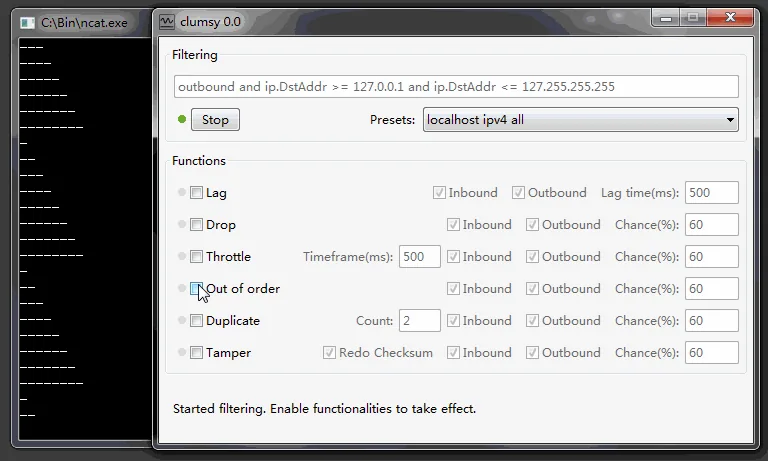
Delay selected packets so later traffic arrives first, helping validate ordering and buffering logic.
Modify matching packet content for controlled robustness tests in a system you are authorized to inspect.
First test in a few minutes
The safest first run is a short latency test against a non-critical application. Keep the filter narrow, write down the baseline, and stop Clumsy as soon as the expected behavior has been observed.
Repeatable QA scenarios
A useful network test has a clear target, one measurable impairment and a recovery check. These recipes provide a starting point, not a universal production profile.
Add a measured delay and check loading indicators, request timeouts, user feedback and recovery after the connection improves.
Open the latency guideLOSSDrop a small percentage of matching packets and observe retries, streaming quality, session state and reconnect behavior.
Open the packet loss guideWINDOWSChoose the correct architecture, understand the portable ZIP and troubleshoot permissions or driver prompts before testing.
Read the Windows 10 guideSOURCETrace the executable archive back to GitHub Releases and confirm the version instead of trusting an unknown mirror or repackaged installer.
Check the GitHub sourceORDERReorder one authorized stream and inspect buffering, sequence handling, final state and recovery without mixing in packet loss.
Open the out-of-order guideUse Clumsy on your own computer, applications and networks, or in an environment where you have explicit permission to run impairment tests. Do not use it to evade game controls, disrupt other users or conceal malicious traffic.
Release status
The jagt/clumsy GitHub Release list currently ends at version 0.3. That release was published on October 21, 2023 and states that its binaries are identical to 0.3 RC4. It adds a higher lag ceiling, updated dependencies, bandwidth support and three signature variants for each architecture.
Searches for Clumsy 0.4, 0.4 v2 or 0.6 can lead to modified builds, community packages or unrelated downloads. A higher number does not prove that a file is newer or official. Before running any such build, identify its publisher, repository, source changes, release notes and checksum. This site downloads only from the verified official 0.3 release.
Official GitHub release with Win32 and Win64 A/B/C builds.
Older official release from December 2014; retained in GitHub history.
Not present in the official jagt/clumsy Release list checked for this update.
Third-party search results exist, but no matching official jagt/clumsy release exists.
Before you download
Short answers to the questions that matter most before running a system-wide network impairment tool.
The latest release in the official jagt/clumsy GitHub Release list is 0.3, published October 21, 2023. This site checked that source on July 20, 2026.
No conventional installer is required. Download the ZIP, extract all files to a folder and run the executable. Do not run only the EXE from inside the compressed archive because its supporting files may not be available.
Use Win64 on a 64-bit Windows installation, which is the normal choice for current PCs. Use Win32 only for a 32-bit x86 Windows system. Windows System Information shows the System Type if you are unsure.
The official 0.3 release says the three binaries use different WinDivert signatures. Their Clumsy features are otherwise identical. The alternatives can help when a security product treats one signature differently.
Not according to the official release history checked for this site. Files using those version labels may be community modifications. Review their repository, author, source changes and checksum before considering them; this site does not distribute them.
The official README explicitly lists Windows 7, Windows 8 and Windows 10, not Windows 11. Some users may run it on newer Windows versions, but compatibility can depend on WinDivert, security policy and permissions. Test only in a reversible environment and do not treat Windows 11 support as an official guarantee.
Clumsy can impair matching traffic, but this site covers only authorized development, QA and reliability testing. We do not provide anti-cheat bypasses, hidden lag-switch configurations or instructions intended to disrupt other players or services.
The source code, README, issue tracker and release history are at github.com/jagt/clumsy. The project homepage is linked from that repository.
Verified source, clear next step
Get the 64-bit A archive from the official GitHub Release, extract it, verify the file and begin with a narrow, authorized test.