
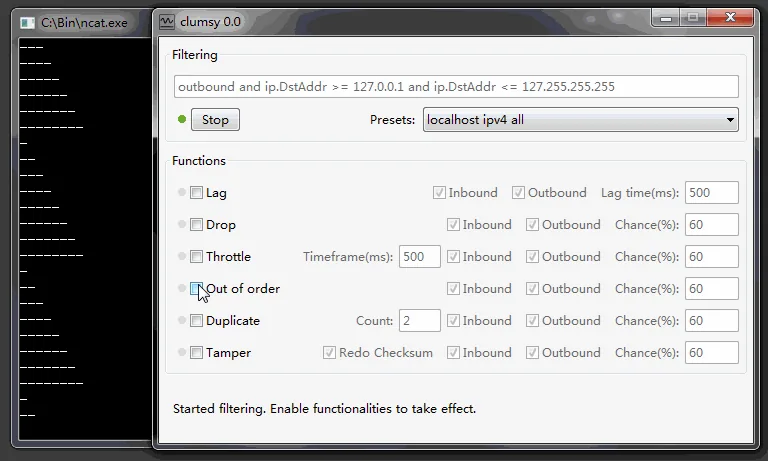
Use a narrow authorized filter, enable Drop with a low chance, perform one known action, inspect both client and server logs, then stop Clumsy and prove the baseline returns.
01
What packet loss means in a Clumsy test
With Drop enabled, selected matching packets are discarded according to the configured chance. Depending on the protocol and application, the effect may appear as a retry, a pause, reduced stream quality, a reconnect, an incomplete operation or a timeout. TCP can retransmit missing data, but retransmission still changes timing and does not guarantee that the user experience remains clear. UDP-based traffic may expose loss more directly.
Packet loss is not the same as latency. A delayed packet still has a path to arrive; a dropped packet does not. Applications may react by retrying, using cached data, switching transport, reconnecting or reporting failure. Test loss separately before combining it with Lag so you can identify which recovery path is responsible for the result.
The Clumsy 0.3 release notes mention drop-throttled support for burst packet loss and more accurate chance handling. Use the exact settings available in your verified 0.3 build and record them with the test result.
| Observed symptom | Possible explanation | Evidence to collect |
|---|---|---|
| Request takes longer | Transport or client retries after loss | Request timestamps and retry logs |
| Action appears twice | Original request completed but response was lost | Idempotency key and server records |
| Stream quality drops | Media or real-time packets are missing | Player metrics and packet counters |
| Session reconnects | Heartbeat or control traffic was lost | Connection lifecycle logs |
| Permanent error | Retry limit or timeout was reached | Client error, server status and timeout settings |
02
Plan a packet loss test with a clear boundary
Start with a user action that has a known expected result. A good example is loading a message history: under low packet loss, the client should show progress, retry safely, avoid duplicate messages and either complete or present a clear retry action. The test should identify what counts as a pass and how long the team will wait before declaring failure.
Choose traffic you own or are authorized to inspect. A narrow host, protocol or port boundary protects unrelated applications on the computer. Close other network-sensitive work and make sure you can select Stop immediately. Do not use all-traffic game filters or so-called undetected lag-switch recipes from anonymous sources.
Collect both sides when possible. Client output alone cannot tell whether the server completed an operation whose response was lost. Server request IDs, idempotency keys, database records and timestamps help distinguish a safe retry from a duplicate side effect.
- Define one operation and its expected result.
- Use a low loss chance before exploring a severe boundary.
- Keep Lag, Tamper and other modules disabled initially.
- Capture client and server identifiers for retried operations.
- Require a clean Stop and baseline recovery check.
03
Run the Clumsy packet loss simulator step by step
Download and extract the official Clumsy 0.3 archive that matches Windows architecture. Verify the release source and checksum before running it. Create a narrow WinDivert filter from official syntax references and confirm that it targets only the authorized application or service.
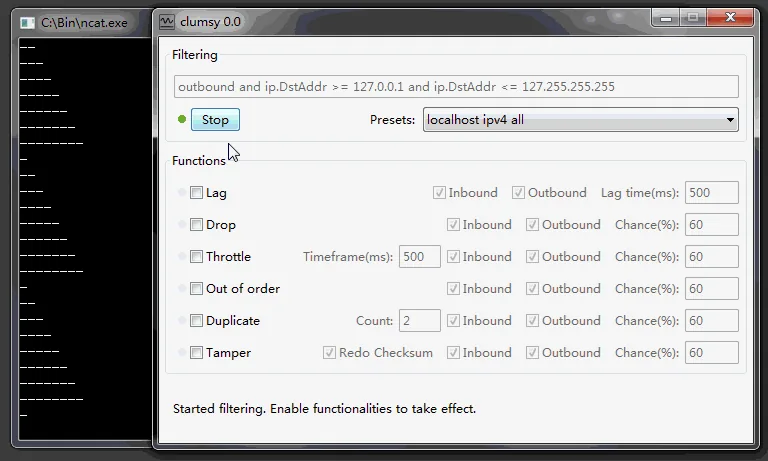
Enable Drop with a low chance. Leave the other modules disabled. Select Start, perform the chosen action once and watch Clumsy counters, client behavior and server logs. Avoid raising the loss percentage while the test is running; record the current result, stop the run and create a separate scenario for another value.
Select Stop and repeat the baseline action. Confirm that retries, queues and connection state settle normally. If the application remains stuck, capture the state before restarting it. The failure may reveal a recovery bug, but only if the network impairment has actually ended.
- Verify the baselineRun the operation normally and capture identifiers.
- Scope the trafficUse the narrowest authorized filter that reproduces the flow.
- Enable DropBegin with a low chance and no other modules.
- Perform one operationObserve retries, feedback and server-side effects.
- Stop and reconcileRestore the baseline and check for duplicates or unfinished work.
04
Build a packet loss test matrix
Use progressive scenarios rather than jumping directly to an unusable connection. Low loss tests normal resilience, a moderate boundary exposes retry and feedback problems, and a severe scenario verifies that the application fails clearly rather than hanging forever. The exact percentages depend on the protocol and product requirements, so treat the matrix below as planning guidance.
Repeat each scenario enough times to distinguish deterministic behavior from chance. Because Drop is probabilistic, one successful request does not prove resilience. Record the number of attempts, completed operations, retries, duplicate effects, error messages and recovery time.
Separate request types. A read-only fetch, file upload, payment-like mutation, live stream and heartbeat have different risks. Do not use one generic loss result to declare the whole product resilient.
| Scenario | Purpose | Pass evidence |
|---|---|---|
| Low loss | Normal resilience | Transparent retry or clear brief feedback |
| Moderate loss | Recovery boundary | No duplicate side effects; actionable error state |
| Burst-like loss | Short network interruption | Reconnect and state reconciliation |
| Severe loss | Failure behavior | Bounded timeout, preserved state and safe retry |
05
Watch for retries and duplicate operations
The most important packet-loss bug may occur when the server succeeds but the response is lost. The client cannot see the success and may retry. Without an idempotency design, a second request can create another order, message, job or payment-like operation. The visible symptom could be a spinner followed by two records.
Use stable request identifiers and inspect server records after every mutation test. A resilient system either recognizes the retry as the same operation or gives the client a reliable way to reconcile state. Clumsy creates the network symptom; it does not replace application-level tracing.
Also test what the user sees after reopening the screen or reconnecting. A clear final state is as important as the immediate error message. If the operation may have completed, the interface should not encourage blind repetition without checking.
A missing response does not prove the server failed. Always reconcile mutation tests with server-side identifiers and records.
06
Interpret TCP, UDP and application behavior carefully
TCP includes retransmission and ordering behavior, so low packet loss may appear as extra delay rather than an obvious missing message. UDP applications often handle timing, recovery or loss at the application layer, making media and real-time symptoms more visible. These general differences do not replace protocol-specific telemetry.
Application libraries add their own retry policies and timeouts. A client may retry a GET automatically but not a mutation, or a websocket may reconnect while losing unsent state. Record library versions and relevant policy when the behavior matters. Otherwise two test environments can use the same Clumsy settings and produce different outcomes.
Use Clumsy as one layer of evidence. Pair it with network counters, client logs, server traces and user-facing observations. That combination explains not only that the connection was impaired, but how the complete system responded.
07
Avoid unsafe and misleading packet loss tests
Do not begin with a high Drop chance across every packet. It can disconnect unrelated tools and obscure the product behavior you intended to study. Do not combine several impairment modules before a single-module baseline exists. Do not accept a single successful request as statistical proof.
Do not disable security controls to run an unknown Clumsy fork, and do not use packet loss to manipulate multiplayer games or third-party services. Authorized scope, a written hypothesis and a recovery check distinguish a legitimate reliability test from disruptive use.
After each run, select Stop and prove the baseline. If the environment remains unstable, capture logs, close Clumsy and investigate other local network tools. A responsible test ends with the system restored.
FAQ
Clumsy packet loss simulator FAQ
What packet loss percentage should I test first?
Start low and increase only when the product requirement calls for a stronger boundary. The right value depends on protocol, baseline and risk.
Why does packet loss look like latency?
TCP or application retries can replace lost data, but the retry adds time. Use logs and counters to distinguish retransmission from pure delay.
Can Clumsy test burst packet loss?
The 0.3 release notes mention drop-throttled support for burst packet loss. Record the exact configuration and verify it in your release build.
Why did my operation happen twice?
The server may have completed the first request while its response was lost, causing the client to retry. Check idempotency keys and server records.
Is Clumsy a safe game lag switch?
This site does not support lag switching, anti-cheat bypasses or disruption of other users. Clumsy should be used only for authorized software and network testing.