
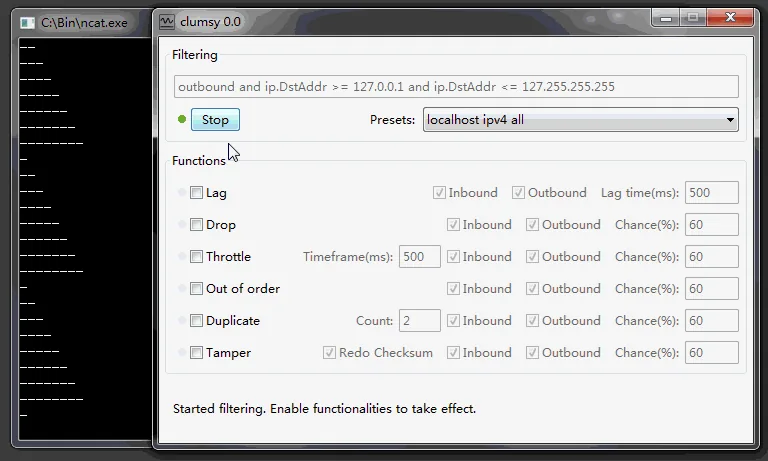
Download and extract Clumsy, run it with suitable permissions, target only the traffic you intend to test, enable one impairment with a modest value, select Start, observe the application, then select Stop and confirm the network has recovered.
01
Before you use Clumsy
A useful impairment test begins with a controlled target and a written expectation.
Write down the behavior you want to evaluate before selecting Start. A good first test might be: ‘When API responses are delayed by 300 ms, the application should show a loading indicator, remain responsive and complete the request without losing form data.’ That statement gives you a target, a measurable impairment and a visible expected result. Avoid turning every control on at once because you will not know which condition caused a failure.
Use Clumsy only on your own systems and traffic, or where you have explicit authorization. The same packet controls that help a QA team reproduce poor connections can disrupt other users when misused. This guide does not cover game cheating, anti-cheat bypasses, concealed lag switching or attacks against third-party services.
- Choose a disposable or reversible test session.
- Record the baseline response time before adding impairment.
- Test one application, endpoint or port at a time when possible.
- Know how to select Stop and close Clumsy before the test begins.
02
Download, verify and extract Clumsy 0.3
The current official release is Clumsy 0.3. Download it from the jagt/clumsy GitHub Release rather than an unknown mirror or an installer that adds its own wrapper. Most current Windows computers need the Win64 archive. The Win32 archive exists for 32-bit x86 installations. If you are unsure, open Windows System Information and check System Type before choosing the file.
The official release provides A, B and C archives for each architecture. According to the release notes, these binaries use different WinDivert signatures while providing the same Clumsy features. Start with the A archive linked on this site. If a security product handles that signature differently, review the official release notes before trying B or C. Do not assume a file named Clumsy 0.4 or 0.6 is a newer official build; those numbers are absent from the official release history checked for this guide.
| Build | Use it when | Verified size | Official file |
|---|---|---|---|
| Win64 A | Windows System Type shows x64 | 536,789 bytes | clumsy-0.3-win64-a.zip |
| Win32 A | Windows System Type shows x86 | 581,772 bytes | clumsy-0.3-win32-a.zip |
A matching name is not enough. Compare the download source, exact byte size and SHA-256 before running a network-level utility.
03
Choose a narrow packet filter
Clumsy uses WinDivert filter expressions to decide which packets enter the impairment pipeline. The filter is the boundary of the test: a narrow expression limits the blast radius, while a broad expression can make the entire computer appear unstable. Begin with the least traffic needed to reproduce the behavior. For example, a team testing an HTTP service might target the service host, protocol or port rather than all outbound and inbound traffic.
Direction matters. Outbound traffic leaves the computer; inbound traffic returns to it. A request and its response may need different observations. If the test fails before you understand why, stop the impairment, return to the known baseline, and simplify the filter. Do not paste an expression from an anonymous game forum without understanding what traffic it matches.
04
Run your first Clumsy latency test
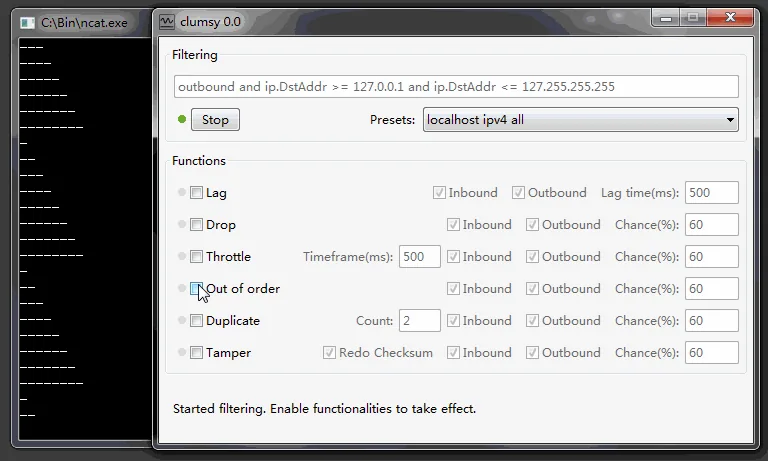
Lag is a practical first module because its effect is easy to observe without intentionally discarding data. Start with a modest delay, such as 200 to 300 milliseconds, and a test application whose normal response you already measured. Configure the filter, enable Lag, enter the delay, then select Start. Perform one known action in the application and compare its feedback with the baseline.
Look beyond total loading time. Does the interface acknowledge the click immediately? Is there a loading state? Can the user cancel? Does a request time out too early? Is form input preserved when the response is delayed? A resilient application communicates that work is continuing and recovers cleanly when the network improves. Record the Clumsy settings, application build and observed behavior instead of relying on memory.
- Measure the baselineRun the same application action without Clumsy and record the normal response.
- Enable LagChoose a modest delay and keep other impairment modules disabled.
- Start the impairmentVerify the filter one last time, select Start and perform one known action.
- Observe the user experienceCheck feedback, timeout handling, retries, cancellation and state preservation.
- Stop and retestDisable Clumsy and repeat the action to prove the environment recovered.
05
Add packet loss without losing control
Packet loss is more disruptive than delay because selected packets never reach their destination. Begin with a low chance and a narrow filter. Your objective is not to make the connection unusable; it is to reveal how the application retries, reconnects and communicates partial failure. A small percentage may be enough to expose a brittle assumption in a streaming connection or a request pipeline.
Watch for duplicate operations. If a client retries after a lost response, the server may have completed the first request even though the client did not receive confirmation. Operations that create orders, payments, messages or records should be designed with idempotency and clear status recovery. Clumsy can help expose the user-facing symptom, but server logs and request identifiers are needed to understand the underlying sequence.
06
Use throttle, duplicate, out-of-order and tamper deliberately
Throttle is appropriate when the problem is limited throughput rather than delayed delivery. It can reveal whether large downloads monopolize an interface, progress indicators stall, or a client makes too many parallel requests. Duplicate packets help test assumptions about unique delivery. Out-of-order behavior can expose sequence and buffering problems. Tamper is an advanced robustness test for traffic you are authorized to inspect and should not be the first module a new user enables.
| Module | Question it helps answer | First-run caution |
|---|---|---|
| Lag | Does the app remain understandable while responses are delayed? | Start with a modest delay. |
| Drop | Do retries and reconnects recover from missing packets? | Use a low chance and verify duplicate operations. |
| Throttle | Does the workflow remain usable with limited throughput? | Test one transfer or service at a time. |
| Duplicate | Is processing idempotent when traffic repeats? | Watch server-side effects, not only UI output. |
07
Troubleshoot startup, security prompts and recovery
Clumsy relies on WinDivert to capture and reinject packets. That low-level behavior can trigger Windows permission prompts or security-product scrutiny. A warning is not proof that a file is malicious, and an official source is not proof that every environment will permit it. Verify the GitHub source and checksum, use the correct architecture, extract the full archive, and review the security event rather than disabling protection blindly.
If Clumsy does not start, confirm that the archive was fully extracted and that the executable and supporting WinDivert files remain together. Try the matching official architecture. If the A signature build is blocked and your policy allows testing, review the official release explanation for the B and C alternatives. Corporate endpoints may enforce driver policies that a local user cannot change; involve the administrator rather than attempting a bypass.
- Never disable endpoint protection merely to force an unknown build to run.
- Keep the official ZIP and its checksum in the test record.
- Use administrator access only when authorized by the device owner or organization.
- Document how the environment was restored after every impairment session.
08
Turn a manual Clumsy test into a repeatable QA workflow
The value of Clumsy comes from repeatability, not from making a connection feel randomly bad. Name the scenario, record the product build, capture the baseline, save the filter and impairment values, define a pass condition, and write the exact recovery action. Pair the visible result with application and server logs whenever the test involves retries or partial completion.
For the next step, use the focused latency testing recipe or packet loss testing recipe.
Include the application build, Windows version, Clumsy version, archive checksum, filter, module values, baseline, observed result, logs and recovery confirmation.
FAQ
How to use Clumsy: common questions
Do I need to install Clumsy?
No. Clumsy 0.3 is distributed as a portable ZIP. Extract all files to a folder and run the executable from that folder.
Why does Clumsy need administrator permission?
Clumsy uses WinDivert to capture and modify matching network packets. Windows may require elevated permission for that low-level operation. Use it only on a device where you are authorized to approve the request.
What should I test first in Clumsy?
Begin with one narrow filter and a modest Lag value against a non-critical application. Delay is easy to observe and easier to recover from than an aggressive packet-loss profile.
Can I change settings while Clumsy is running?
For repeatable results, stop the current impairment, change one variable, confirm the filter, and start a new run. Record each run separately.
How do I restore my normal connection?
Select Stop, close Clumsy after the test, confirm its process ended, and repeat the baseline action. Investigate VPN, proxy, firewall or other packet tools if normal behavior does not return.
Where can I verify filter syntax?
Use the official jagt/clumsy documentation and the WinDivert filter language documentation. Do not paste broad filters from unknown sources without understanding their scope.